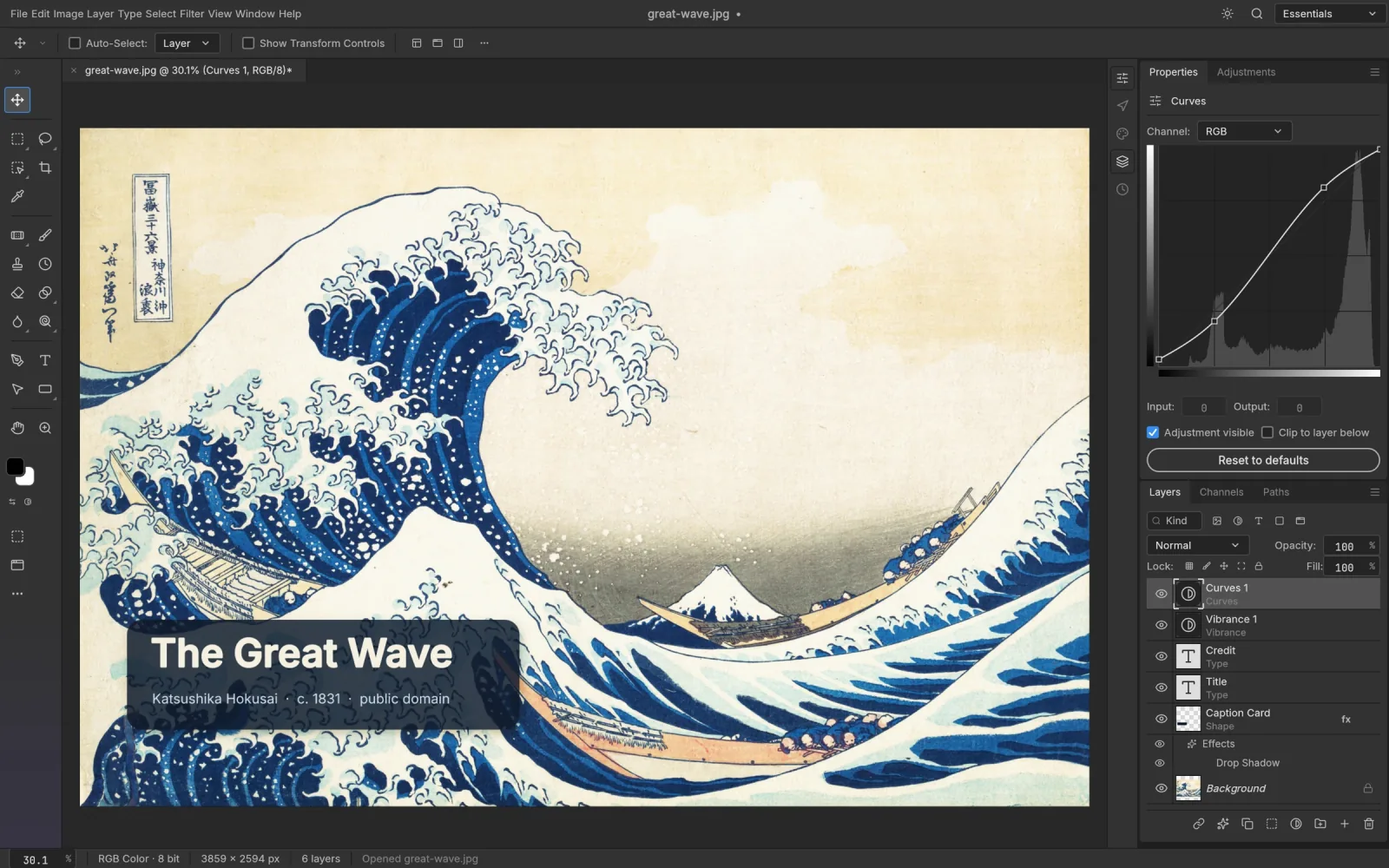
What comes through when you open a PSD
PSCraft reads the document itself, not a flattened preview of it. In practice that means:
- Layers and groups keep their names, order, blend mode, opacity and fill.
- Masks, both pixel and vector, stay attached and editable.
- Adjustment layers open as adjustment layers. Double-click a Curves or Levels layer and its settings are there.
- Layer styles such as Drop Shadow, Stroke and Bevel & Emboss stay live.
- Type layers remain text. Click into one and retype.
- Smart Objects and their smart filters are preserved.
Parts of a file that PSCraft doesn't model yet are carried through to the saved copy instead of being thrown away, so opening and re-saving doesn't strip a document down.
A typical five-minute fix
- Open the editor and drag the .psd onto the window. File › Open works too.
- Find the layer in the Layers panel. Click the eye icon to hide what you don't need.
- Make the change: retype a headline, nudge a Curves adjustment, repaint a mask.
- Save your changes as a PSD with File › Save. If the recipient only needs a picture, File › Export › Export As produces a PNG, JPEG or WebP.
The shortcuts are the ones you know: Ctrl/⌘ J duplicates a layer, Ctrl/⌘ T starts Free Transform, Ctrl/⌘ Z undoes.
Three things to know first
Fonts. The browser build carries two typefaces, Inter and JetBrains Mono. A type layer set in another font may render differently from how it looked in Photoshop, so check text-heavy designs before exporting.
Saving. Nothing is saved automatically in the browser. Save or export before closing the tab.
Maturity. The editor underneath, PhotoCraft, is still in alpha. Everyday files open and save reliably, but a complex production document deserves a look in Photoshop before it goes to print.
Very large documents
Files beyond Photoshop's 2 GB PSD limit use the PSB format. PSCraft opens PSB the same way; how big a file you can work on depends on the memory available to your browser.
PSCraft or Photoshop?
For checking a file, fixing a detail or exporting assets on a computer without Photoshop, PSCraft does the job. For generative fill, plug-ins or Creative Cloud libraries you still need Adobe's app. The full comparison goes through it point by point.